
Many active content creators face sudden download failures on social platforms. You copy a video link and paste it into a tool, but nothing happens. The process freezes or displays an error message. A SnapTik TikTok video download fail can waste valuable time and interrupt daily workflows. Understanding these common technical glitches helps you fix them quickly.
Several technical factors trigger download errors on video platforms. Content settings, server updates, and network issues often cause these failures. SnapTik provides a reliable solution to bypass these obstacles effortlessly.
Why Do TikTok Video Downloads Fail?
Video downloads fail for several distinct reasons. Identifying the precise root cause saves you time and effort. Most issues originate from platform rules, network glitches, or user side settings.
Private Account and Content Restrictions
Account privacy settings represent the main cause of save failures. Creators can set their profiles or individual videos to private mode. External fetching tools cannot bypass these official privacy boundaries. You must ensure the source video is completely public before attempting a download.
Broken or Incomplete Video URLs
Copying an incomplete URL prevents the tool from locating the source file. Shortened mobile share links sometimes fail to resolve properly on third party web servers. Always copy the full video address directly from the official share menu.
Cache Build-up and Network Instability
Stale browser cache files conflict with modern cloud scripts, causing processing loops. Slow mobile data or unstable local Wi-Fi connections also interrupt media streaming requests. Clearing your browser cache restores proper site interactions quickly.
How SnapTik Solves Every TikTok Download Issue
SnapTik addresses these technical failure points with an advanced cloud architecture. The service processes requests on dedicated remote servers rather than relying on your device’s limited resources.
- Direct Cloud Extraction: Bypasses local processing barriers by fetching media directly on cloud servers.
- Automatic Watermark Removal: Strips unwanted logo overlays dynamically while preserving original full HD clarity.
- No Software Required: Functions smoothly inside mobile and desktop web browsers without extra app installs.
- Universal Device Support: Delivers seamless video processing across Android, iOS, Windows, and macOS platforms.
How to Download TikTok Videos Without Errors Using SnapTik
Saving videos through SnapTik requires just a few straightforward steps. Follow this exact workflow to prevent a SnapTik TikTok video download fail every time.
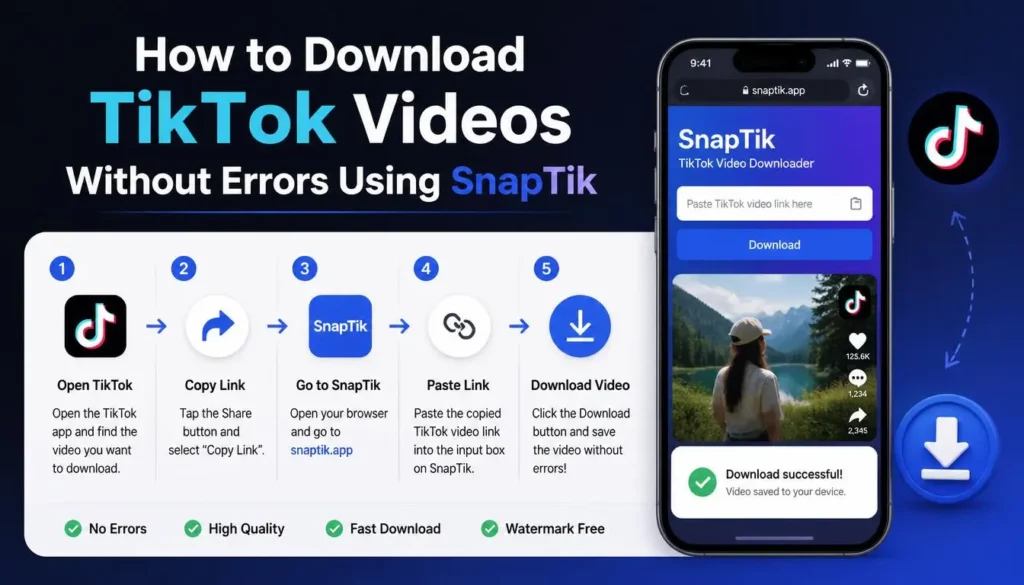
- Copy the Target Link: Open your video app, tap Share, and select Copy Link.
- Visit the Web Tool: Open your browser and navigate directly to the SnapTik homepage.
- Paste the URL: Paste the copied link into the designated input box on the screen.
- Process the File: Click the green Download button to initiate cloud processing.
- Save to Device: Select your preferred resolution server link to store the clean video file locally.
Proven Tips to Prevent Future Download Failures
Applying preventive habits stops processing glitches before they disrupt your work.
Maintain an active, high-speed internet connection during video processing runs. Keep your web browser updated to the latest available software build. Clear temporary browser files periodically to eliminate code conflicts. Verify your device has sufficient storage space before initiating large file transfers.