
Managing a consistent posting schedule across multiple social platforms demands a massive amount of short-form video content. Manually saving clip after clip from TikTok wastes precious hours every single week. Fortunately, learning how to batch download TikTok videos transforms your content workflow into an efficient power system.
By capturing multiple TikTok clips at once, you build a versatile media bank for YouTube Shorts, Instagram Reels, and Facebook Watch. This comprehensive step-by-step guide explains the smartest methods, automated workflows, and best practices to bulk save clips cleanly for future scheduling.
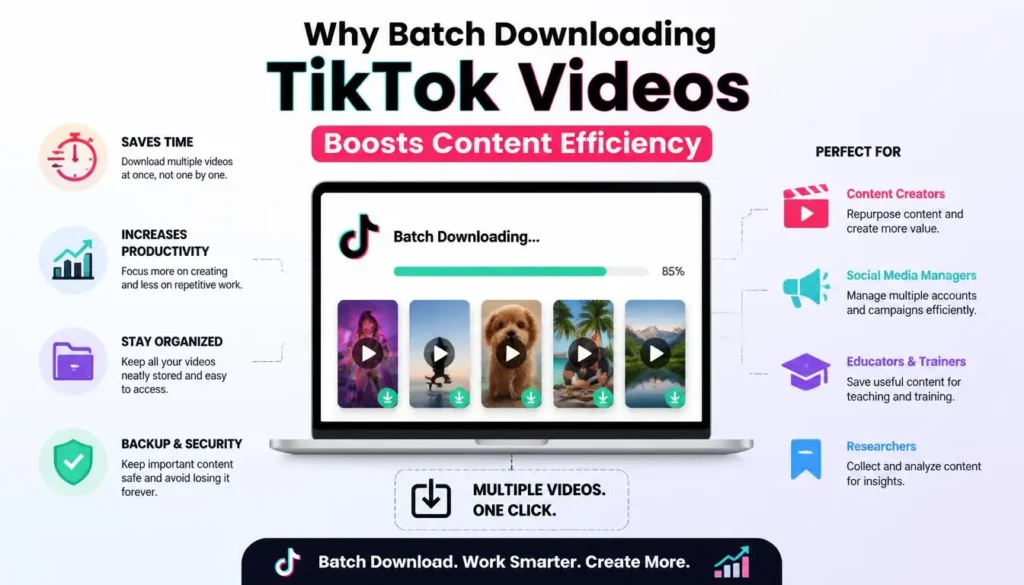
Why Batch Downloading TikTok Videos Boosts Content Efficiency
Saving short-form video content individually slows down creator growth. However, switching to a batch workflow instantly multiplies your publishing speed and sharpens your distribution strategy.
Saves Essential Production Time
Manual saving requires opening a post, copying the share link, launching a third-party downloader tool, saving the file, and naming the video. Repeating this routine 30 times consumes hours of screen time. In contrast, bulk saving processes entire profile URLs or link lists within seconds.
Simplifies Cross-Platform Content Repurposing
Multi-platform presence is non-negotiable for digital creators. Consequently, gathering dozens of clean clips in one organized folder lets you upload content to social media schedulers instantly. Therefore, your brand stays active on YouTube Shorts and Instagram Reels without extra daily effort.
Builds a Reliable Offline Vault
Viral trends fade, creators alter account settings, and videos occasionally get deleted. So, storing downloaded video files on local drives guarantees long-term content ownership. Furthermore, you can pull past high-performing clips anytime for seasonal promotional campaigns.
Key Requirements Before You Start Bulk Saving TikTok Videos
Before initiating bulk video downloads, setting up a smooth workspace prevents technical glitches. Preparing the right foundation makes the extraction process seamless.
- Organized Link Storage: Prepare a plain text document or Google Sheet containing the target TikTok video links or username handles.
- Sufficient Storage Space: Ensure your PC, Mac, or cloud storage has at least 5GB to 10GB of free space for HD MP4 files.
- Stable Internet Connection: A high-speed Wi-Fi or Ethernet connection prevents dropped downloads during large bulk tasks.
- Clean Downloader Tool: Select a reliable web service, browser extension, or desktop software that supports batch processing without watermarks.
How to Batch Download TikTok Videos Step-by-Step
1.Gather Target TikTok Video Links:Organize URLs before starting bulk extraction.
Open TikTok on your desktop browser or mobile app. Browse through the targeted profile or collection. Copy the direct URL for each video you want to queue and paste them neatly into a text file or spreadsheet.
2.Select a Reliable Bulk Downloader Tool:Pick a tool supporting multi-link or profile downloads.
Launch a reputable online bulk TikTok downloader or desktop utility. Dedicated web tools allow users to paste multiple links simultaneously or enter a public username handle to pull entire profile feeds.
3.Configure Output Settings:Ensure clean MP4 output without video watermarks.
Select HD MP4 as your target output format. Ensure the no-watermark toggle is enabled so platform logos do not obstruct your video frame when re-uploading to other channels.
4.Process and Download the Zip File:Save packed media directly to local storage.
Click the bulk process button. The converter processes the links in parallel. Once completed, download the compressed ZIP package containing all your clean MP4 files and extract them into your workspace folder.
Top Tools for Batch Downloading TikTok Videos Without Watermarks
Selecting the right utility depends on your operating system and content volume. Below is a comparison of the top methods used by content managers.
| Tool Type | Processing Speed | Best Used For | Key Advantage |
| Web-Based Bulk Downloaders | High | Quick profile downloads | No software installation required |
| Desktop Software Utilities | Ultra High | Large-scale channel archiving | Handles hundreds of links smoothly |
| Browser Extensions | Medium | On-the-fly browsing saves | Direct download buttons on page |
| Python Automation Scripts | Maximum | Advanced developers & agency leads | Fully custom automated pipelines |
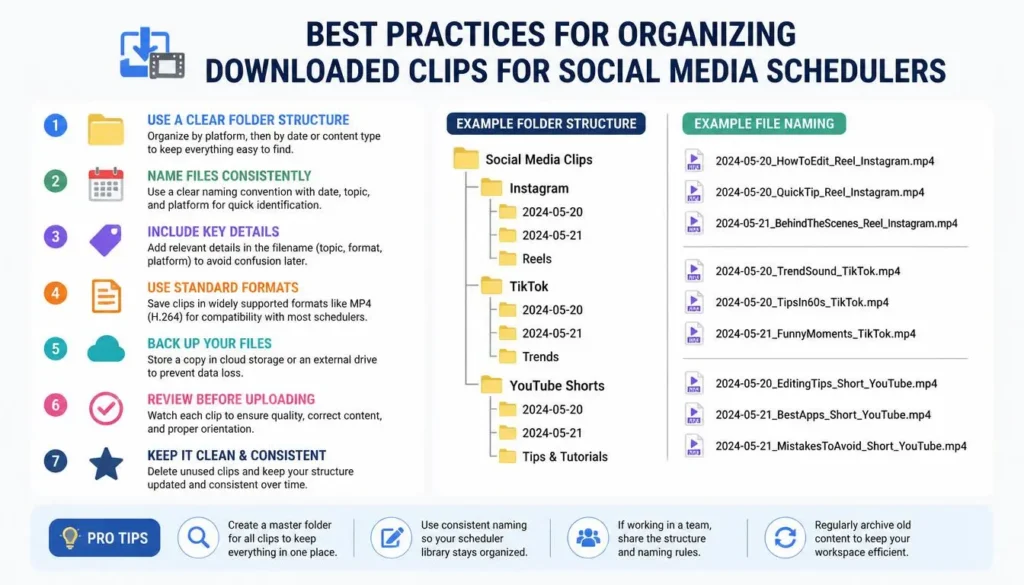
Best Practices for Organizing Downloaded Clips for Social Media Schedulers
Downloading your videos is only half the battle. Organizing your media files systematically prevents total chaos when loading content into scheduling dashboards.
Use Standardized Naming Conventions
Avoid keeping generic filenames like video_12345.mp4. Instead, rename files using structured formats such as YYYY-MM-DD_Topic_Platform.mp4. Consequently, team members can search, identify, and retrieve specific content assets instantly.
Categorize Files by Pillar or Topic
Create subfolders organized by content categories, such as Educational, Product Demos, Behind The Scenes, or Trending Hooks. As a result, when filling your weekly content calendar, you can easily pull a balanced mix of media types.
Pre-Write Captions and Hashtags in a Central Sheet
Pair each downloaded MP4 file with a matching row in a master planning document. Record the corresponding caption, call-to-action link, targeted hashtags, and scheduled posting date. Consequently, uploading into social media schedulers becomes a fast copy-and-paste task.
How to Upload and Schedule Downloaded TikTok Videos
Once your media library is neatly structured on your drive, distributing the videos across platforms requires a clear scheduling workflow.
Choose a Social Media Management Platform
Select a modern social scheduling software like Buffer, Hootsuite, Later, Publer, or Metricool that supports short-form video publishing for Reels, Shorts, and TikTok.
Bulk Import Videos to Your Media Library
Navigate to your scheduler’s media asset library. Select your newly extracted MP4 files and batch upload them into the system. High-performance tools process multiple media uploads simultaneously in the background.
Set Optimal Posting Times and Queue Settings
Attach your pre-written captions and hashtags to each item in the queue. Adjust crop dimensions if necessary, pick a clear thumbnail frame, and assign preferred publishing times based on audience activity metrics.
Frequently Asked Questions (FAQs)
Conclusion
Mastering how to batch download TikTok videos provides a massive operational advantage for modern content creators, social media managers, and digital agencies. Extracting watermark-free HD clips in bulk eliminates manual repetition and accelerates multi-platform publishing. By organizing your media vault systematically and pairing it with automated scheduling tools, you keep your social channels active, engaged, and steadily growing with minimal daily strain.