
TikTok Stories are temporary posts that vanish after 24 hours. Creators and users often share casual updates, behind-the-scenes clips, and fast trends in their stories. However, once the 24-hour limit ends, the clip disappears completely. If you do not save it early, you lose that content forever.
Saving a TikTok Story allows you to watch offline, archive your own ideas, or review promotional content later. Fortunately, simple methods exist to keep these clips safe on your phone or computer. This guide explains step-by-step solutions to save TikTok Stories quickly and safely.
Why Do TikTok Stories Disappear?
TikTok introduced Stories to encourage quick, real-time sharing. These posts disappear after 24 hours to keep user feeds fresh and dynamic. Unlike standard videos on your profile grid, temporary stories do not remain on your feed indefinitely.
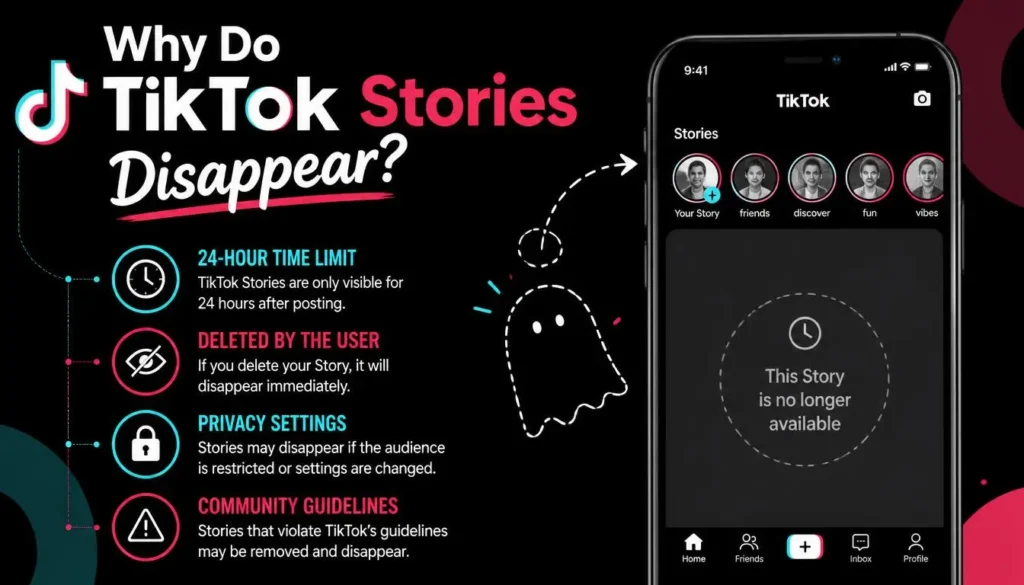
Because of this short lifespan, you must act fast to preserve important content. Knowing how to download or capture these temporary videos ensures you never miss important updates, inspiration, or memories.
How to Save Your Own TikTok Stories
You can easily save your own stories before or after publishing them. TikTok provides built-in tools that make this process effortless.
Method 1: Save While Creating Your Story
You can save your clip directly to your camera roll during the editing process.
- Step 1: Open TikTok and tap the + icon to record or upload a story.
- Step 2: Add your favorite filters, stickers, or text effects.
- Step 3: Tap the Save button on the side menu before pressing Post to Story. The video instantly downloads to your gallery.
Method 2: Save Your Published Story
If your story is already active on your profile, you can still download it within the 24-hour window.
- Step 1: Go to your profile and tap your profile picture to open your active Story.
- Step 2: Tap the Three Dots icon on the right side of the screen.
- Step 3: Select Save Video from the pop-up options. The original file will download directly to your phone storage.
How to Save Someone Else’s TikTok Story
Downloading stories from other creators requires a different approach because TikTok restricts direct downloads on temporary content. Here are two reliable methods to capture any public story.
Method 1: Use an Online TikTok Story Downloader
Online tools like SnapTik allow you to save public TikTok Stories directly to your device without logos or watermarks.
- Step 1: Open TikTok and navigate to the story you want to preserve.
- Step 2: Tap the Share icon and select Copy Link.
- Step 3: Open your mobile or desktop browser and go to [suspicious link removed].
- Step 4: Paste the copied URL into the box and click the Download button.
- Step 5: Choose the high-definition MP4 file option to save the clean video to your device.
Method 2: Use Built-In Screen Recording
If you prefer not to use external websites, your mobile phone includes a built-in screen recorder.
- On iPhone: Open Settings > Control Center and add Screen Recording. Swipe down from the top right, tap Record, and play the TikTok Story. Tap the red indicator to stop recording when finished.
- On Android: Swipe down twice from the top of your screen to open the Quick Settings panel. Tap Screen Record, play the story, and press Stop when done.
- Crop the Video: Open your phone’s gallery app and trim the video edges to remove the TikTok navigation buttons and progress bar.
Best Tools to Download TikTok Stories HD
Using a web-based utility is often the fastest way to download clean, full-resolution story videos.
| Tool Name | Watermark Removal | No Registration | Platform Compatibility |
| SnapTik | Yes | Yes | Web, Android, iOS, PC |
| SSSTik | Yes | Yes | Web, iOS, Android |
| SaveTT | Yes | Yes | Web, Desktop |
| SnapTikTok | Yes | Yes | Browser-Based |
Tips for Saving TikTok Stories Safely
When downloading social media content, always keep privacy and digital safety in mind.
- Respect Copyright: Always give credit to original creators if you plan to share their story content elsewhere.
- Avoid Suspicious Apps: Do not install unnecessary third-party applications that require your TikTok login credentials. Web-based down-loaders work safely without account access.
- Check Device Storage: High-definition video files can consume phone memory quickly. Clear your downloads folder periodically to free up space.
10 Frequently Asked Questions (FAQs)
Conclusion
TikTok Stories offer a great way to view short, daily content updates, but their 24-hour limit means valuable videos vanish fast. You can easily save your own stories directly inside the app before or after posting. For other users’ stories, web-based tools like SnapTik and built-in mobile screen recorders provide fast, safe ways to store clips on your camera roll. Follow these methods to keep your favorite social clips saved permanently before they disappear.