
Digital marketing on short-form video platforms moves at an extraordinary pace. Platforms like TikTok, Instagram Reels, and YouTube Shorts update their algorithms constantly. As a result, brands must adjust their content strategies rapidly to maintain high visibility. Marketers cannot afford to rely on guesswork when creating visual campaigns. Instead, top digital agencies turn to rigorous competitor video analysis to discover what truly drives engagement. Using SnapTik for competitor video analysis gives agencies a clear edge over basic manual reviews.
SnapTik has emerged as an essential research tool in this analytical process. Although many casual users view it strictly as a video downloader, digital marketers use it as a powerful research utility. By retrieving high-definition, watermark-free files, strategy teams can dissect viral content frame by frame. This detailed guide explores how digital marketers leverage SnapTik for competitor video analysis, improve creative brief quality, and build winning short-form campaigns.
What Is SnapTik and Why Marketers Rely on It
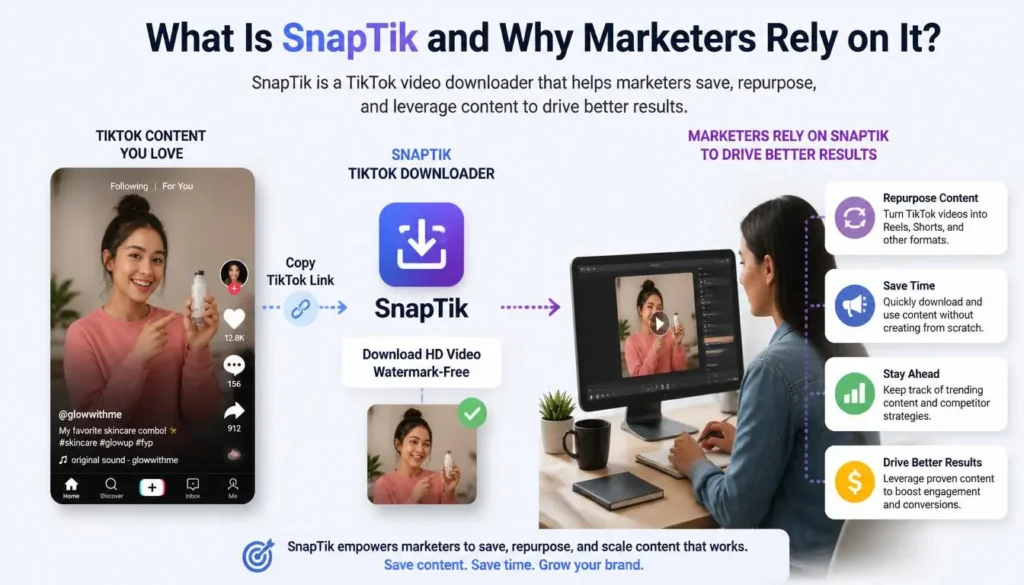
SnapTik is a web-based utility designed to download public TikTok videos directly into clean, high-definition MP4 files. Unlike standard platform downloads, SnapTik processes source links to strip away native platform logos and floating creator handles. Consequently, marketers gain access to unobstructed footage that reveals key visual elements.
Eliminating Platform Branding
Standard video downloads from short-form platforms automatically attach floating logos, creator handles, and end-screen slates. These visual overlays frequently obscure important parts of the video frame. For example, a moving watermark often covers lower-third caption text, product placements, or subtitled callouts. Therefore, removing these overlays is critical for creative teams who want an unfiltered view of the original creative setup.
Key Tool Features That Aid Competitive Research
- Watermark Removal: Keeps original framing completely clean for granular editing reviews.
- High-Definition Preservation: Retains original source resolution without causing heavy compression.
- No Registration Required: Allows strategy teams to save reference clips anonymously and quickly.
- Cross-Device Compatibility: Operates smoothly across desktop workstations, tablets, and mobile devices.
The Role of Competitor Video Analysis in Modern Digital Marketing
Competitor video analysis is not about copying other creators. On the contrary, it focuses on understanding audience psychology, messaging gaps, and platform mechanics. When a competitor video achieves millions of views, specific structural variables trigger that success. Utilizing SnapTik for competitor video analysis ensures every visual detail is accessible for inspection.
Benchmarking High-Performing Visual Content
Marketers study competitor assets to set realistic creative benchmarks. By analyzing view-to-like ratios and comment density across top-performing clips, agencies identify exact content themes that resonate. Consequently, team members spend less time testing weak ideas and focus on concepts with proven market demand.
Identifying Niche Content Gaps and Opportunities
While analyzing rival content, strategists often uncover significant messaging gaps. Competitors might address a popular customer problem, yet they may fail to offer a clear solution or strong call to action. Therefore, marketing teams can use these insights to produce superior videos that fill those exact information gaps.
Step-by-Step Framework: Using SnapTik for Video Analysis
To turn raw downloads into actionable strategy, digital marketing agencies apply a structured four-step workflow. This systematic framework turns random video browsing into organized data collection.
Step 1: Locating and Filtering Outlier Competitor Videos
First, research teams scan rival brand profiles to locate outlier posts. An outlier post is a video that achieves significantly higher view counts than the channel average upload.
- Open the target competitor platform profile.
- Filter uploads by highest view counts and recent viral trends.
- Select three to five videos that generated exceptional user engagement.
- Copy the video URL string for each selected clip.
Step 2: Downloading Clean MP4 Files Without Watermarks
Next, analysts navigate to SnapTik using a standard web browser. They paste the copied video URL into the input field and click the processing button. Within seconds, the utility generates a watermark-free MP4 download file. Analysts save these clean video files directly into an organized project folder.
Step 3: Performing Frame-by-Frame Visual Deconstruction
After downloading the clean files, video editors import the MP4 footage into video editing software. Because no platform branding blocks the image, editors can scrutinize individual frames clearly.
| Analysis Variable | What Marketers Inspect | Strategic Objective |
| Opening Hook (0-3s) | Visual movement, facial gestures, and text pop-ups | Measure scroll-stopping efficiency |
| Editing Pace | Frequency of jump cuts and scene transitions | Calculate average shot duration |
| Text Typography | Font size, screen position, and background highlights | Evaluate readability without audio |
| Product Framing | Lighting setups, camera angles, and focal depth | Replicate professional visual quality |
Step 4: Extracting and Analyzing Audio Hooks
Audio selection heavily influences short-form video reach. Marketers use editing tools to split the downloaded video into separate visual and audio layers. Consequently, they can analyze background music levels, spoken voiceover tone, and custom sound effect placement.
Strategic Benefits of Unwatermarked Content Analysis
Working with watermark-free files grants digital agencies several strategic advantages over basic manual viewing inside social media apps. Incorporating SnapTik for competitor video analysis turns subjective reviews into precise visual breakdowns.

Uncovering Hook Mechanics and Visual Pattern Interrupts
The first three seconds of a video determine its overall completion rate. When marketers view videos inside native app interfaces, user interface buttons often cover key visual hooks. However, clean SnapTik files allow analysts to isolate exact visual pattern interrupts, such as sudden camera movements, prop introductions, or unexpected physical actions.
Studying On-Screen Text and Typography Strategies
Many users watch short videos with their device volume muted. Therefore, top creators rely on heavy text overlays to convey main points quickly. Clean downloads allow strategy teams to analyze typography placement, color contrast ratios, and text animation timing without interference from floating creator tags.
Evaluating Cut Speed and Editing Rhythms
Fast editing keeps viewers engaged longer. Marketers count the exact number of cuts within a ten-second sequence to calculate the pacing rhythm.
Understanding shot frequency helps creative teams craft editing guidelines tailored to specific audience segments.
Building an Internal Competitive Intelligence Vault
Individual video reviews yield useful immediate tips, but long-term growth requires continuous intelligence gathering. Digital agencies maintain centralized digital asset libraries to store and organize competitive research.
Asset Organization and Categorization
Agencies build structured cloud drives where downloaded competitor videos are sorted by niche, brand name, and creative format.
Each video file name includes key performance indicators, such as estimated view counts and engagement scores. As a result, new creative team members can quickly reference top-performing structures before drafting fresh creative briefs.
Team Collaboration and Creative Brief Development
When creative directors present prospective video strategies to clients or internal stakeholders, clean video references build instant confidence. Marketers splice together short, watermark-free reference clips to illustrate proposed camera angles, transition effects, and text animations clearly.
Ethical and Fair-Use Guidelines for Marketing Teams
While SnapTik provides access to downloadable footage, digital marketers must maintain strict ethical boundaries. Using third-party utilities for competitive intelligence requires responsible asset management.
- Never Reupload Competitor Clips: Reposting stolen content violates platform policies and damages brand reputation.
- Use Assets Solely for Research: Downloaded files should remain inside internal analysis tools or private creative presentations.
- Focus on Structural Patterns: Copy the underlying structural framework, hook mechanics, and pacing style—never the verbatim script or visual design.
- Ensure AdSense & Fair-Use Compliance: When publishing educational case studies online, always provide original commentary, critique, and transformative value.
Frequently Asked Questions (FAQs)
Conclusion
SnapTik has evolved from a simple video saving utility into a valuable tool for modern digital marketing research. Stripping platform watermarks gives growth agencies an unobstructed view of high-performing short-form video assets. Consequently, strategy teams can deconstruct editing cuts, analyze visual hooks, and evaluate typography choices with unmatched precision.
Succeeding on short-form video channels requires continuous learning and rapid adaptation. By utilizing SnapTik for competitor video analysis inside a structured workflow, marketers turn raw competitor footage into predictable video growth strategies. Start building your competitive intelligence library today to fuel your next viral campaign.